Usage Scenarios
App Version v4.0.0Looking After Home Together
A full shared grove example: share your home with your partner, help your parents keep track of things at their house, decide who can tend and who can only view, and handle news, removal requests and expiry letters day to day.
Updated on Nov 3, 2026 ~14 min read
On this page
However well one person remembers, the things at home are often used and put away by someone else. This page walks through one example of looking after groves together with family. For details on each button, see Shared Groves: Inviting Companions and Shared Groves: Roles, News and Leaving.
The family in this example
Mori has three groves in MononoMori:
- My Home: where Mori lives with their partner, Rin. The study, bedroom and living room are all recorded.
- Office: Mori’s own desk and locker.
- Parents’ House: “My Old Room” and the storage room at the family home. Mom and Dad usually look after these.
Mori wants to look after My Home with Rin and Parents’ House with Mom and Dad, and keep Office to themselves.
Step 1: Decide which groves to share and how many people
Sharing works one grove at a time. Office is not shared, so nobody else sees it.
Mori wants to invite Rin, Dad and Mom: 3 people in all. Plus can share with only 1 companion, so Mori needs Premium (up to 6). Companions are counted by person: if Mori later invites Rin to tend Parents’ House too, Rin does not take a second spot. Joining is free for Rin, Mom and Dad. They need no paid plan.
Step 2: Share My Home with Rin
- In My Forest, touch and hold My Home and choose Share This Grove….
- Read the sharing notes: Rin will see every place and item, including photos, notes and attachments. Mori’s baskets, Memory Books, Memory Forest and Recycle Bin stay private. Tap Share This Grove.
- Tap Invite Companions, enter Rin’s Apple Account email, choose Can tend, tap Add to This Grove, then tap Send Invitation to send Rin the link.
- Rin opens the link on their own phone, and My Home appears in Rin’s forest.
Step 3: Look after Parents’ House with Mom and Dad
Share Parents’ House the same way, then add Dad and Mom one by one.
- Dad often tidies the storage room, so he gets Can tend: he can add, edit and move items.
- If someone at home only wants to look things up, not change them, choose Can view: they can browse and search, without moving things by accident. You can change roles any time on the Companions page.
Under Companions in More › Shared Groves, tap a companion to give them a nickname only you can see, for example to show an email address as “Mom”. You can also fill in your own name and photo in How Companions See You, so your parents know at a glance who you are.
Day to day: who put what where
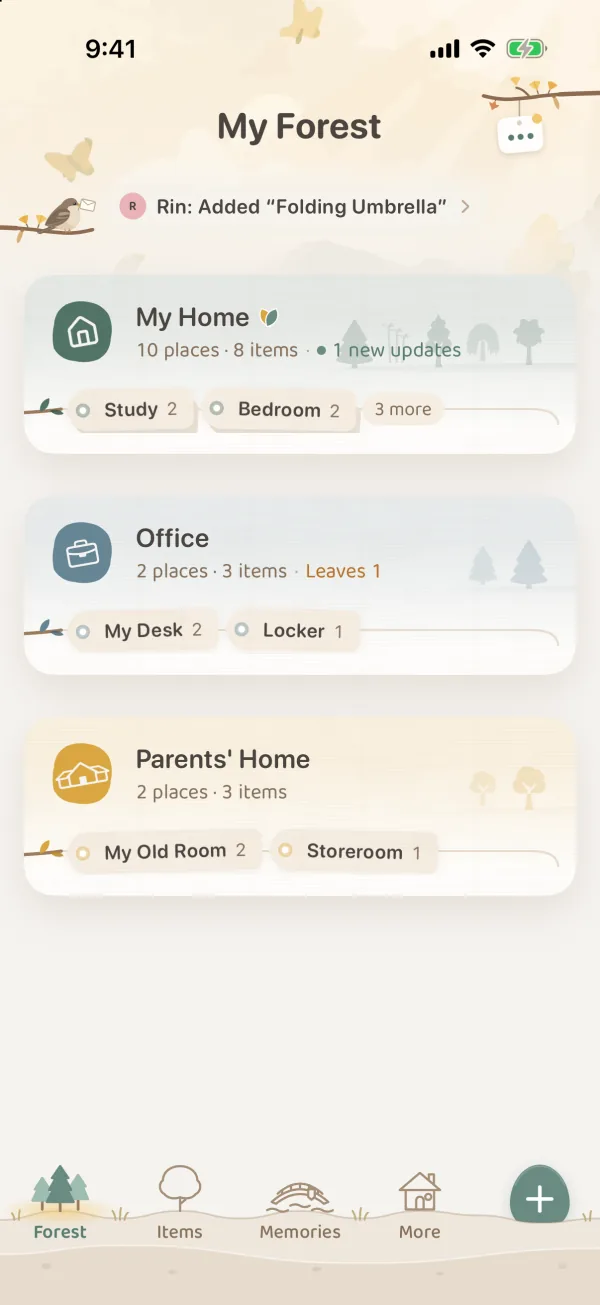
Dad records a ladder in the storage room. When Mori opens My Forest, the top of the page shows “Dad added “Ladder””, and the Parents’ House card mentions the news too. Tap it to see Grove News: who did what, and when.
To find something, just search in Items: items from shared groves sit alongside your own. To see only one side, use Whose Items under More in Filter and choose Private or Shared.
When someone wants to throw something out
Mom thinks the old game console can go. When she deletes it on its item page, she gets Request deletion. The console does not vanish right away; it is marked Deletion requested.
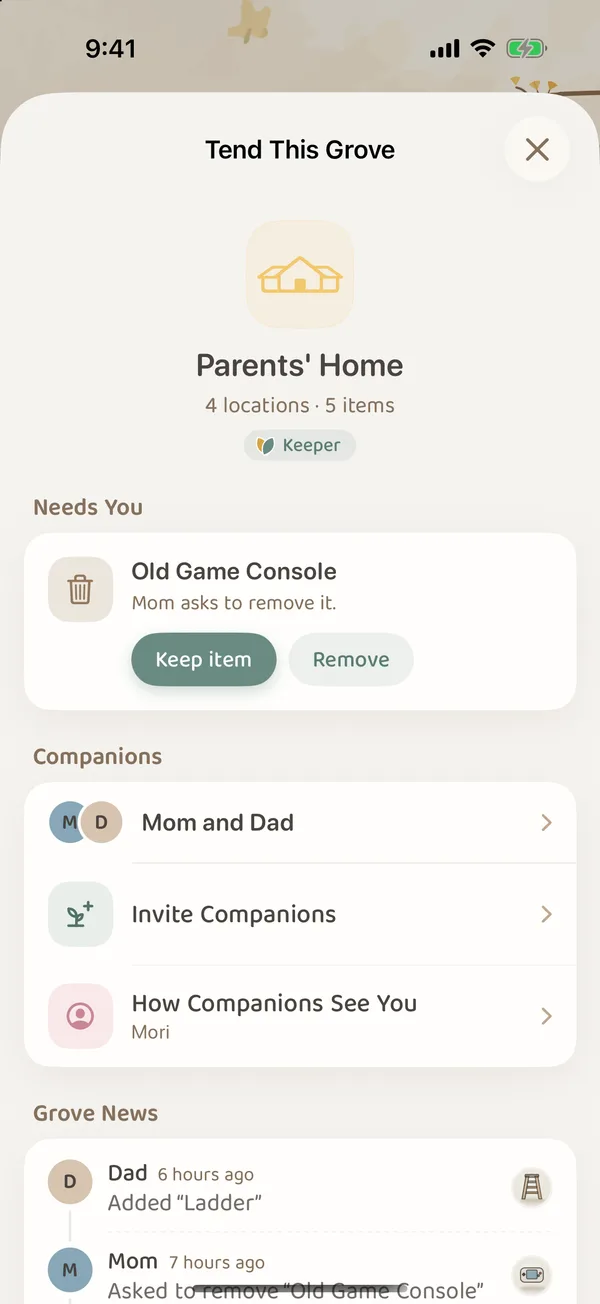
In Tend This Grove for Parents’ House, Mori sees “Mom asks to remove it.” After talking it over with Mom and Dad, Mori can tap Keep item, or tap Remove and confirm Move to Recently Deleted. Removed items go to this grove’s Recently Deleted first, so Mori can still restore them later.
A proper farewell is only for items in your own forest. Items in a shared grove can only be removed. The Memory Forest and Memory Books also belong to you alone and never appear for your companions.
Who gets the letter when something expires
A box of medicine in the Parents’ House storage room has an expiry date. When it is about to expire, everyone who has expiry letters on gets a letter, with the same day’s reminders merged into one. Even without notifications, it still shows up in Leaf Gathering.
If Mori does not want letters about Parents’ House, they can turn off just that grove under Shared Groves in More › Expiry Reminder. A grove turned off sends no letters, but its leaves still show in Leaf Gathering. For when letters arrive and how far ahead, see Leaf Gathering and Expiry Letters.
When things change
- Someone steps back: a companion can Leave This Grove from Tend This Grove, and choose to keep a private copy. Mori can also remove a companion on the Companions page.
- No more sharing: Mori can Bring Back to My Forest. Everything is kept, and family members can keep private copies of what is already on their devices.
- The plan changes: if Mori switches to Plus with more than 1 companion, Mori gets a 3-day grace period to choose who stays. If Mori switches to the free plan, the shared groves rest and everyone can only view them. See What happens when your plan changes.
Label boxes and cupboard doors with the same place names you use in the grove, so everyone at home can match them up easily. Do not put sensitive details such as ID numbers or door codes in notes in a shared grove. All your companions can see them.