Farewells & Memories
App Version v4.0.0Forest Stamp Book
The stamp book holds the 21 stamps you collect while using MononoMori: where to open it, how to earn each stamp, which two unlock Forest Signs, and whether your stamps follow you to a new device.
Updated on Nov 3, 2026 ~16 min read
On this page
The Forest Stamp Book holds watercolor stamps that mark small moments of caring for your forest: planting your first item, giving things a place, making a backup. A stamp is pressed automatically when you meet its condition. There is nothing to claim. Version 4.0 has 21 stamps.
Opening the stamp book
- More: tap the ribbon along the bottom edge of the forest card at the top to open Explore the Forest, then tap the Forest Stamp Book card at the top.
- The sparrow on the Forest page: when a new stamp arrives, the sparrow on the Forest page says “A new stamp is waiting in your stamp book”. Tap it to open the book.
- Insights: the stamps row in More › Insights opens it too.
Reading the stamp book
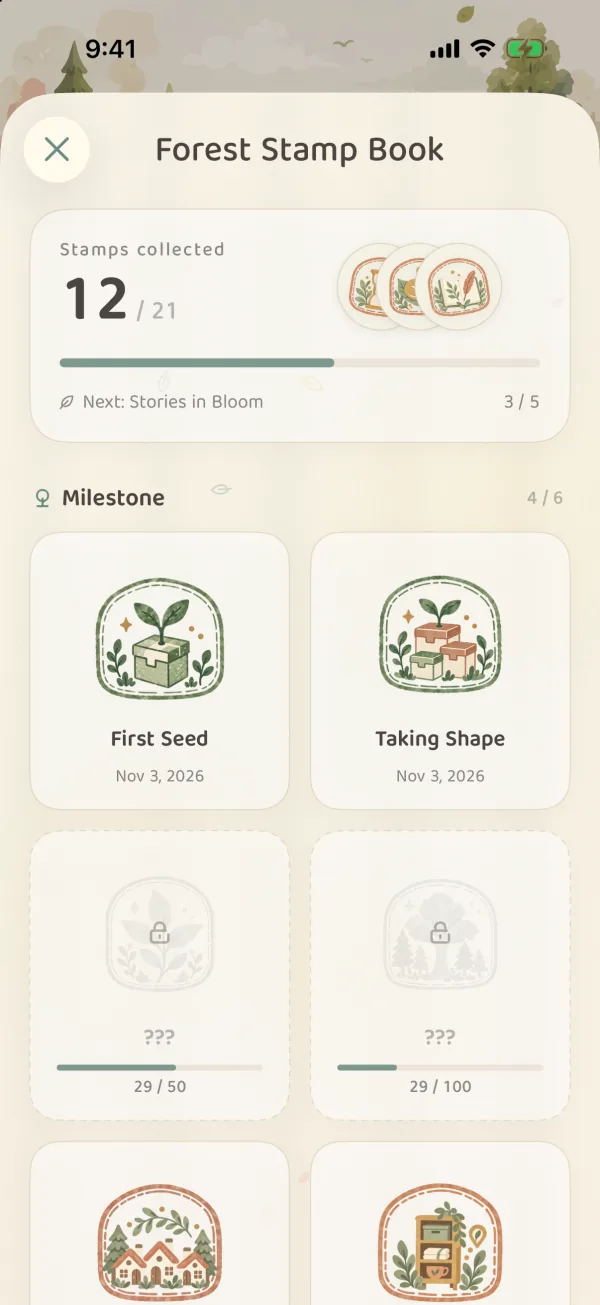
The top of the overview shows how many stamps you have and what your next goal is. Stamps are grouped into Milestone, Activity, Exploration and Special. Pressed stamps are in color with a date. The rest are pale outlines marked ”???”.
Tap a stamp to turn to its page:
- A pressed stamp shows its name, the date and a short note to remember it by.
- A stamp you do not have yet says how to earn it. If it counts something, you see your progress.
- Swipe left or right to turn to the next stamp. Tap Stamp Book at the top left to go back to the overview.
When you have a new stamp, the book opens on its page and presses it for you. If several arrive at once, they are pressed one by one.
How to earn the 21 stamps
| Stamp | How to earn it |
|---|---|
| First Seed | Plant your first item |
| Taking Shape | Reach 15 items in your forest |
| Lush Greenery | Reach 50 items; unlocks the Summer · Green sign |
| Forest of All Things | Reach 100 items |
| Woodland Neighbors | Have 3 groves |
| Everything at Home | Give 10 items a place |
| First Memory | Keep an item in the Memory Forest for the first time |
| Stories in Bloom | Leave memories for 5 items; unlocks the Spring · Sakura sign |
| Perseverance | Open the app 7 days in a row |
| Collected Glimpses | Add photos to items 10 times |
| Garland of Thanks | Say farewell to two or more items at once and keep them in the Memory Forest |
| Memory Capture | Add the first photo to an item |
| New Territory | Create your first grove |
| Timely Care | Fill in expiry dates for 5 items |
| Close at Hand | Pin 5 items |
| A Gentle Rest | Hibernate 1 item |
| Ready for the Journey | Put 1 item in a basket |
| A Page Takes Root | Put text, a photo, a sticker or an item on a Memory Book page, then save it |
| Tending Together | Share a grove, or join one a companion shares with you |
| Wisdom Forest | Plant 15 items with Gather or AI recognition |
| Forest Safekeeping | Make a complete manual .forest backup |
A few things that are easy to mix up:
- Taking Shape, Lush Greenery and Forest of All Things count every item record you have ever planted. Items you later said farewell to or deleted still count. Changing a quantity does not. The free plan holds at most 30 items at a time, but if you say farewell to old things and plant new ones, the total keeps growing. So you can collect these three stamps (and the Summer · Green sign) on the free plan too, a little at a time.
- Stories in Bloom counts items kept in the Memory Forest, not photos in a Memory Book.
- Everything at Home, Timely Care and Close at Hand count different items. Editing the same item again and again, or setting its quantity to 10, still counts as one.
- Ready for the Journey needs a real item in the basket. An empty basket, or only a Wish List entry, does not count.
- Garland of Thanks needs several items said farewell to together (for example, select them in Items and tap Farewell), with at least two kept in the Memory Forest. Sending the whole set to the Recycle Bin does not count. See Farewell and the Recycle Bin.
- Wisdom Forest needs the items actually planted. Taking the photo and writing the names without planting does not count. See Gather from a Photo.
- Forest Safekeeping only counts a complete manual backup that finished successfully. Automatic backups and CSV exports do not count. See Forest Backup & Restoration.
- Perseverance counts calendar days. Opening the app several times in one day counts once, and missing a day starts the count over. A stamp you already have is never taken back.
Forest Signs unlocked by stamps
The Forest Sign is the app icon on your Home Screen. The spring and summer signs are unlocked by stamps:
| Sign | Unlocked by |
|---|---|
| Spring · Sakura | Stories in Bloom |
| Summer · Green | Lush Greenery |
Once you have one of these stamps, its page says “This stamp unlocked the “Spring · Sakura” sign”. Tap Use next to it to make it your app icon. The sign you are using is marked In use. You can also pick from all the signs in Forest Sign. See Forest Sign & Forest Atmosphere.
Updates, deleting and new devices
- After you update the app: it presses the stamps it can confirm from the data you already have, so several may appear at once after an update. Forest Safekeeping, Tending Together and Garland of Thanks are only pressed when you do the thing itself. They are not added after the fact.
- After you delete items: stamps you already have are not taken back.
- On a new device: pressed stamps sync to your other devices through iCloud and are included in complete backups. Progress toward stamps you do not have yet (such as your streak of days) stays on that device. Progress on two devices is not added together.
FAQ
I did the thing but see no stamp?
First check that it really saved: the item shows up in Items, the Memory Book page still has its content when you reopen it, the backup says it finished. Then open the stamp book and look at the overview. The colored stamp and its date are what count. Missing the stamping animation does not mean you missed the stamp.
Should I do these things just to get stamps?
No. Each stamp goes with something that is useful anyway. It will be pressed on its own when you use that feature.