Memory Forest & Moments in Time
Explore MononoMori's Memory Forest and Moments in Time system. Wander through seasonal timelines, enjoy warm encounters in 'Today's Reunion', trace life stories through connected year rings, and preserve intangible memories.
Page Overview
When belongings complete their mission, preserve shared chapters in an eternal forest
“The physical lifespan of an object may reach its end, but the warmth of shared time never fades. Physical space belongs to the present; emotional space belongs to memories. Letting go of an item is not forgetting it; instead, we invite its spirit and stories into an unfading forest.”
💡 Navigation Guide: If you have not yet experienced the Farewell Ceremony, or wish to understand how everyday disposal differs from solemn goodbyes, we recommend reading the foundation guide first: Item Deletion & Farewell Ceremony. This chapter focuses on your emotional sanctuary after parting—wandering through Memory Forest, encountering Today’s Reunion, and exploring the Moments in Time system that chronicles an item’s complete lifetime.
🌌 Entering Memory Forest: A Sanctuary of Seasons
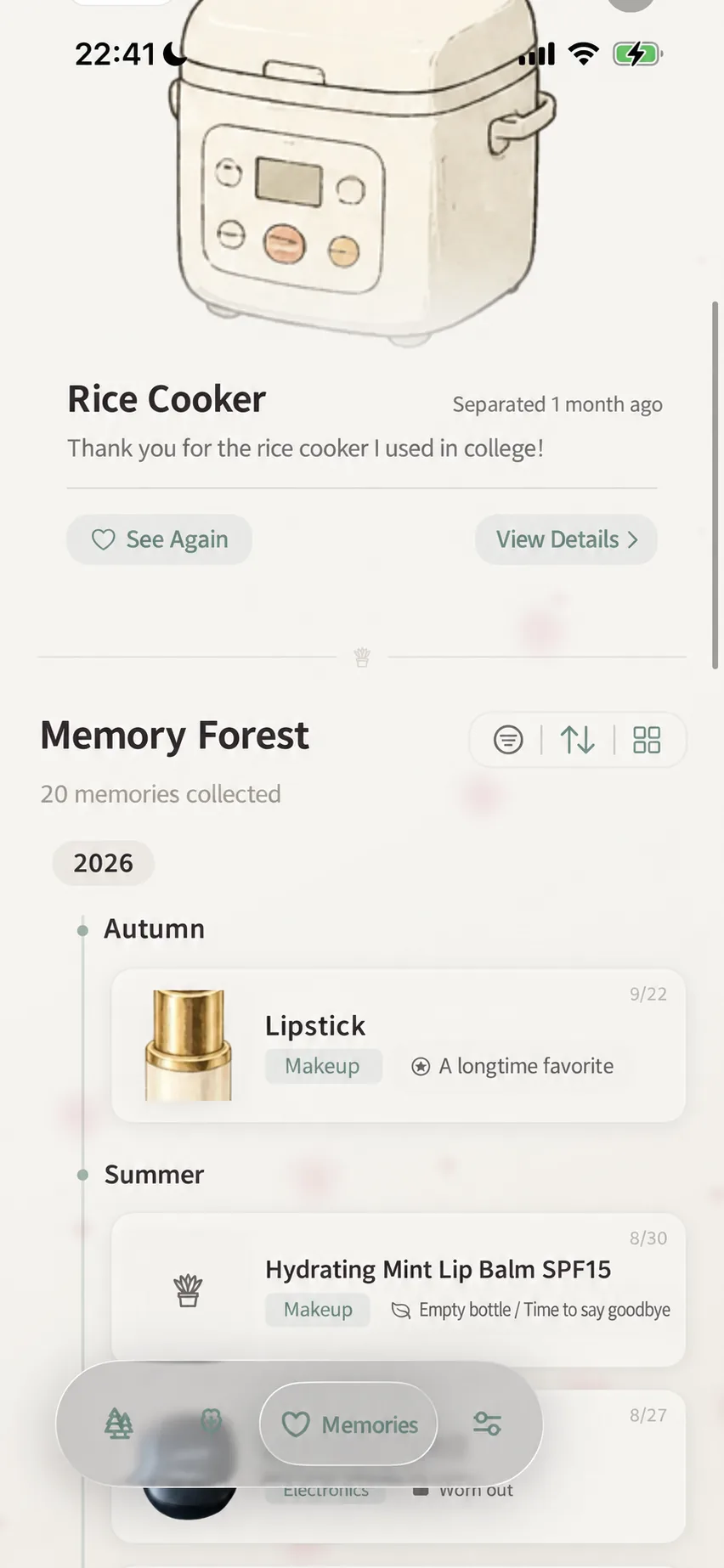
Tap the heart-embossed “Memories” tab in the bottom navigation bar to enter your dedicated Memory Forest.
Here, you will find neither daily organizational clutter nor mental tidying burdens, but a quiet, contemplative sanctuary.
1. Today’s Reunion: Heartwarming Unplanned Encounters
When Memory Forest holds records, a “Today’s Reunion” card may gently emerge at the top of the screen, reintroducing an item you once parted with. This is not a rigid calendar anniversary reminder, nor does it guarantee a specific item every single day. If a refresh button is available, tap it to see another companion; tapping the card opens its full memory view.
2. The Four Seasons Scroll: Natural Sediment of Time
Beneath Today’s Reunion, the system organizes departed belongings into a chronological scroll structured by years and seasons (e.g., Autumn, Summer, Spring, Winter 2026):
- Object Chronicles: Each card clearly marks the departure date, category, and farewell reason (such as “Mission Accomplished” or “Recycled”);
- Flexible Views & Filters: Use the top toolbar to filter by farewell reason, switch chronological order, or toggle between rich gallery cards and compact lists.
📜 Moments in Time: Chronicles of an Object’s Life
In MononoMori, a farewell is never an isolated, flat memorial card.
Every belonging accumulates a living Year Ring (Moments in Time) throughout its daily companionship. Notes jotted down during maintenance, reflections added over years of use, and room reassignments during moves are woven into its historical fabric.
When an item completes its mission and you conduct a Farewell Ceremony, the farewell reason, your closing reflections, and final milestones seamlessly culminate into a unified “Moments in Time” scroll.
Opening any memory entry reveals its preserved photos, departure reasons, notes, and milestones:
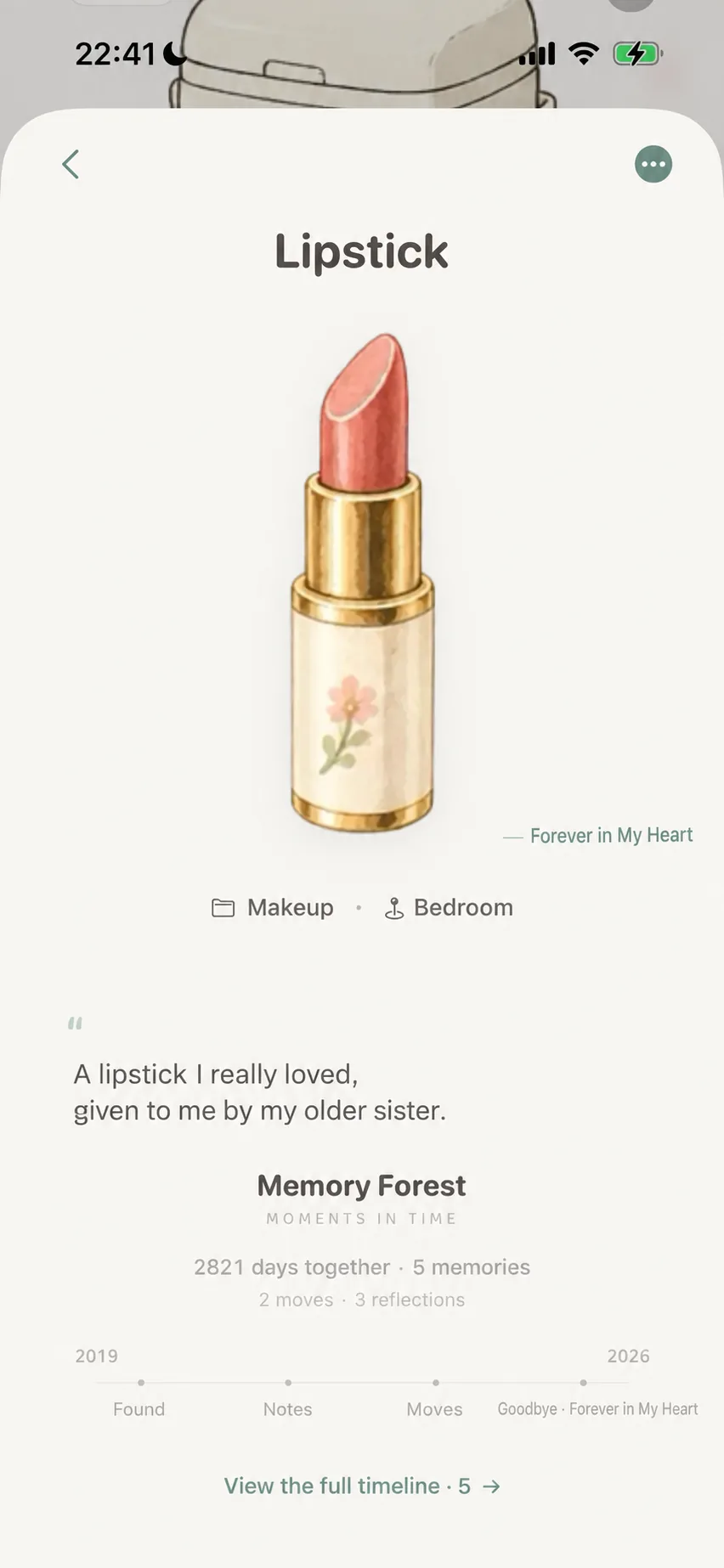
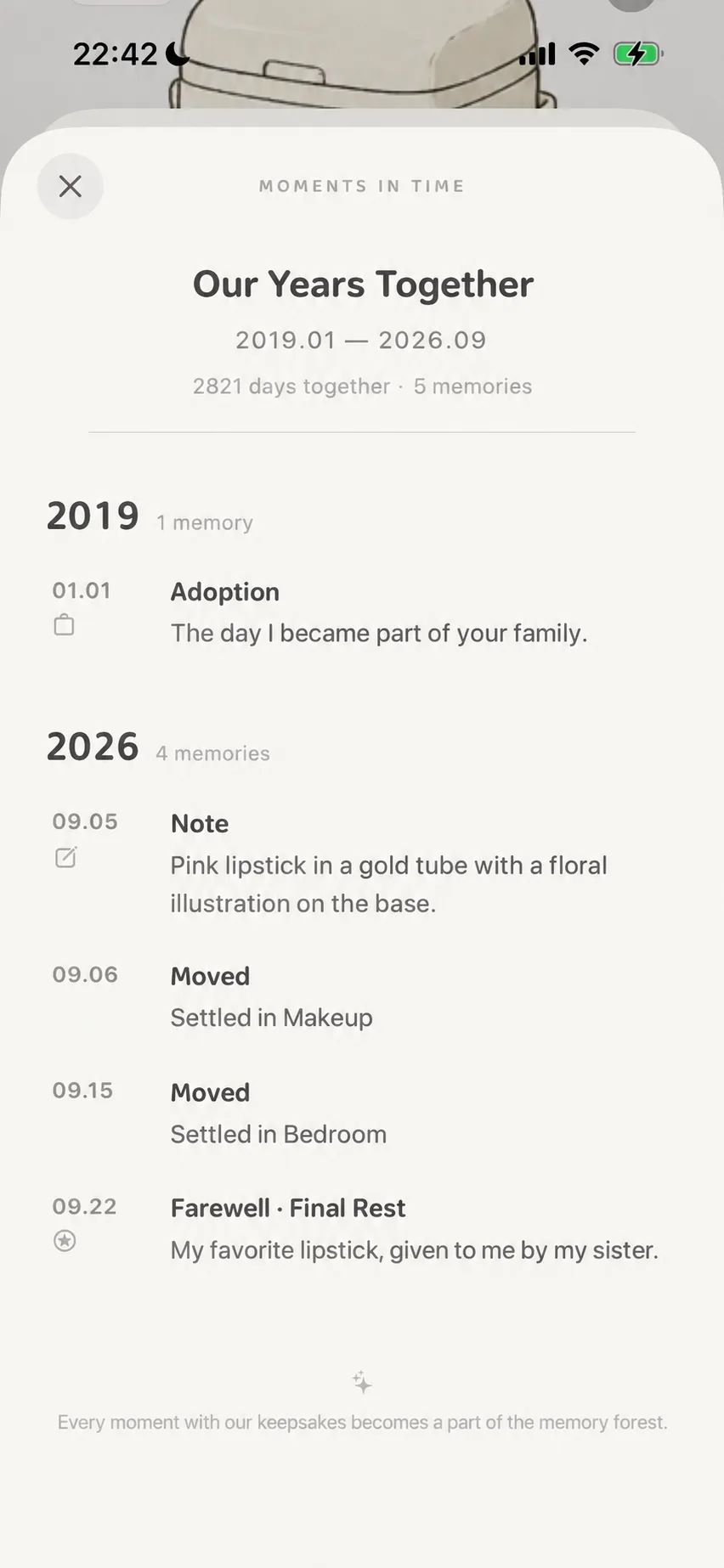
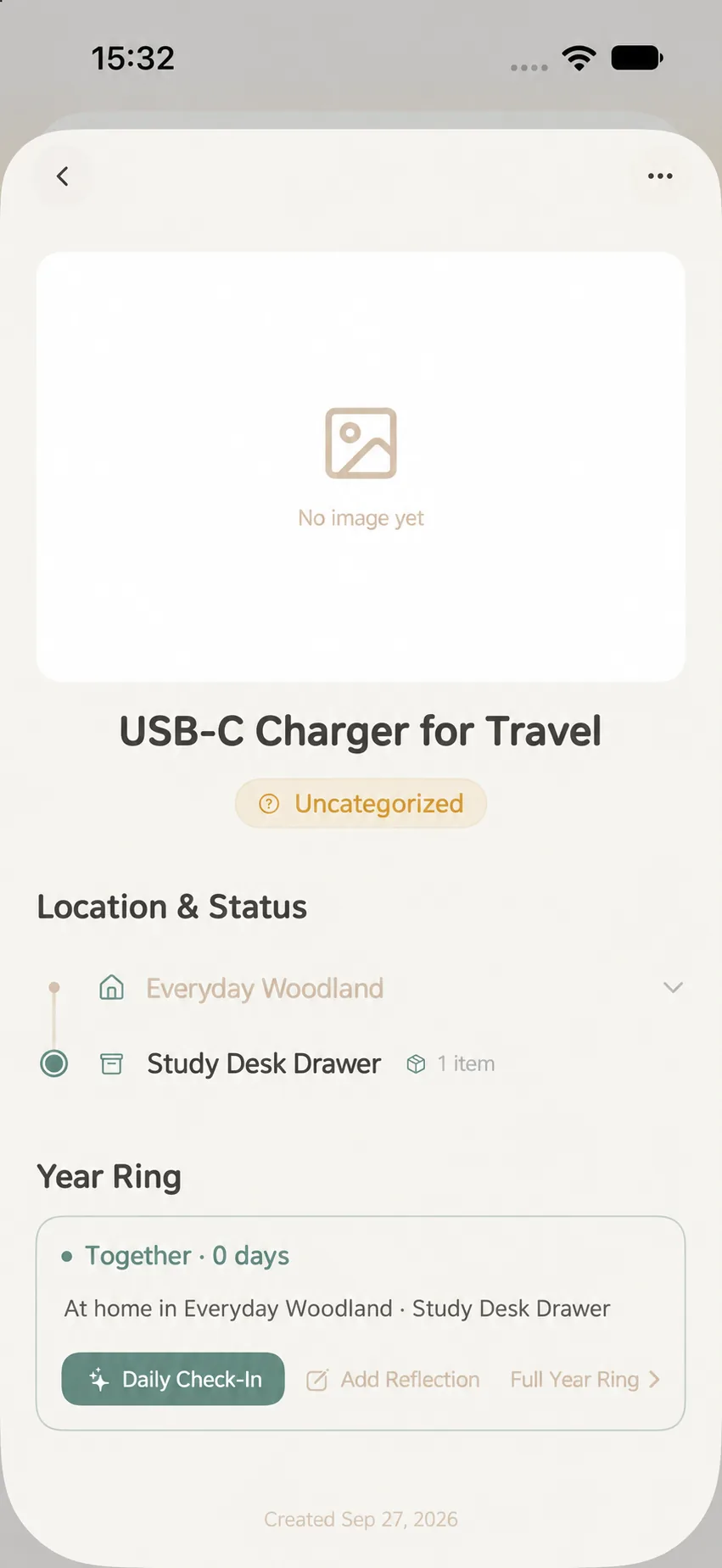
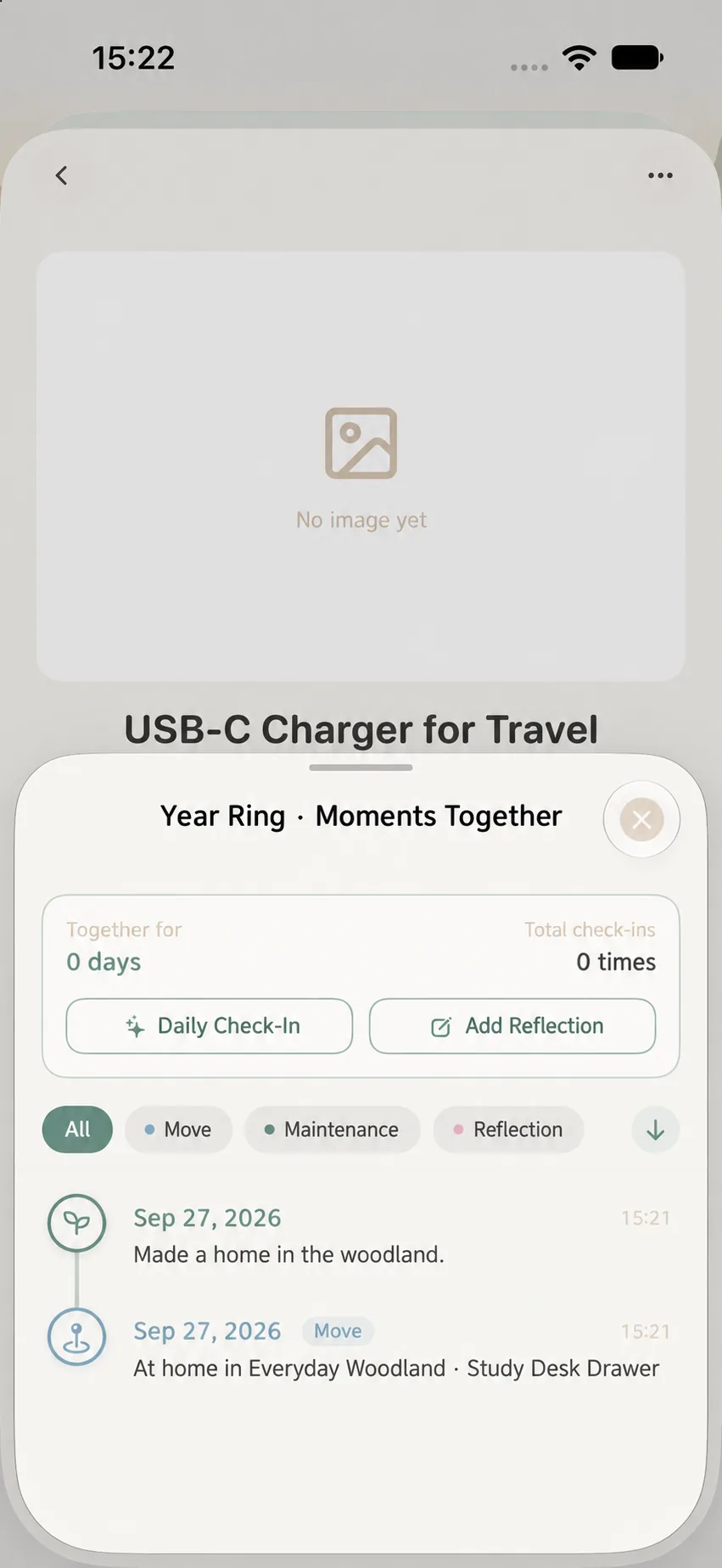
Even for active belongings still in your woodlands, the “Moments in Time” card is already visible within their detail view. An active item displays ongoing companion milestones; once retired through a ceremony, it transitions into the permanent Memory Forest archive. The sample item below shows how active items accumulate moments before retirement:
1. Companionship Statistics: Giving Weight to Time
The system combines the item’s initial acquisition date with its farewell date, calculating the exact time shared (e.g., 2,821 days together · 5 milestones · 2 relocations · 3 journal reflections). An ordinary object gains profound personal narrative and warmth.
2. The Complete Moments in Time Scroll
Tapping “View Full Moments” unfurls the entire companion scroll, displaying recorded milestones based on real historical entries:
- Acquisition: Records when the item first joined your life and the corresponding life stage (e.g., January 1, 2019 · Early Career);
- Traces of Living: Preserves notes, photos, and room moves made along the way;
- Final Farewell: Commemorates the reason, mood, and date of retirement (e.g., September 22, 2026 · Mission Accomplished);
- An earnest closing message at the base of the scroll: “Every moment shared with this item has become a cherished memory.”
Within the full view, filter buttons at the top let you isolate All, Relocations, Maintenance, or Reflections, while arrow shortcuts jump to recent entries. Only historically logged actions generate timeline nodes. To record a new milestone for an active item, return to its detail view and use “Check In” or “Record Thought”.
✈️ Creative Inspiration: Preserving Intangible Experiences
While MononoMori excels at physical belongings, many users expand its sanctuary to intangible experiences:
“The essence of recording belongings is preserving evidence of our connection with the world.”
1. Unforgettable Trips & Journeys 🎒
- How to Log: Create an item named “2025 Kyoto Autumn Foliage Trip”, attaching an iconic landscape photo or train ticket stub;
- Mindful Farewell: Upon returning home, hold a Farewell Ceremony for the trip with a reason like “Special Milestone” or “Cherished Memory”;
- Memory Forest Sanctuary: Record companions and travel journals. The trip now rests quietly under Memory Forest and may greet you unexpectedly in “Today’s Reunion”.
2. Milestone Experiences & Digital Accomplishments 🎟️
- Concerts & Festivals: Log the wristband and ticket stub of a transformative live concert, then let go of the physical paper with complete peace of mind;
- Gaming Feats & Professional Certificates: Log an epic 100-hour video game completion or a hard-earned professional certification;
- Heirloom Photo Albums: Scan and photograph fragile family albums, record the family history behind them, and declutter crumbling paper binders.
🔄 Restoration: Can Departed Items Return?
In MononoMori, letting go is never a rigid punishment. Life takes unexpected turns, and the system balances resolute decluttering with compassionate flexibility:
1. Default Restoration Rules
- Built-in Reasons: Items marked as “Lost”, “Worn Out”, or “Recycled” typically support re-storage back into active woodlands, whereas “Sold”, “Gifted”, or “Donated” items do not offer a return path by default. Available options always reflect the current detail card.
2. Custom Reason Toggles
When creating custom farewell reasons, you can freely toggle whether restoration is permissible:
- For reasons like “Lent to a Friend” or “Temporary Storage”, enable the restore toggle so the item can be retrieved the moment it returns;
- For reasons meant to overcome compulsive hoarding, disable the toggle to give yourself firm psychological closure.
3. How to Perform Re-Storage
If an item’s farewell reason allows return, open its memory detail view and tap the restoration action provided. The app will guide you to pick a woodland location and status before returning it to active rotation.
❓ Frequently Asked Questions
Q1: Does retiring an item affect main dashboard counts?
Yes. Departed items are excluded from active counts and room inventories, maintaining an honest picture of your physical living space while preserving historical records in Memory Forest.
Q2: Why record items here instead of saving photos in a phone camera roll?
Phone camera rolls are crowded with screenshots, receipts, and work files, making past items difficult to revisit and devoid of life-stage context. Memory Forest offers a dedicated sanctuary with ritualized farewells, calculated days together, and joyful serendipitous encounters through “Today’s Reunion”.
Q3: Are prices, brands, and notes deleted after a farewell?
No. The farewell converts the record into memory status while retaining historical data. If iCloud Sync is enabled and working, records sync across devices; you can also export manual backups anytime.
Q4: Does Memory Forest support search and filtering?
Yes. You can filter by farewell reason or use the global search bar to locate specific names and stories.
Q5: If an item is re-stored back to active inventory, does its Moments in Time scroll break?
Restoration returns the item to your active forest. Prior farewell milestones and notes remain part of its ongoing story.